
RetroTorch
A torch for the N79, using the camera LED, the screen and the keypad light
- Symbian
- PyS60
- Mine
- Utility
All files
- RetroTorch.sissis · 34 KB
sha256 6f30975cc91379760b8befb2728c06827696ee4779445f958937da50d228a08a
Requires: Python for S60 1.4.5 →
About
Works on stock phones (self-signed, only user-grantable capabilities, verified from the built files; tested on a hacked N79 only). A hacked phone (Easy Hack Kit, RomPatcher+ with Open4All rp+) is needed only to install on a different drive than Python for S60.
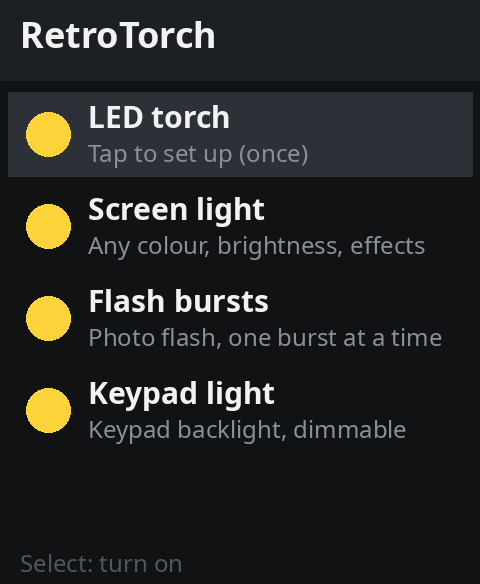
RetroTorch is a torch app for the Nokia N79 and other S60 3rd Edition phones. Its main light is the camera's LED flash as a steady torch, and it can also use every other light the phone has.
Lights
| Light | What it does |
|---|---|
| LED torch (default) | The camera's dual LED as a steady light, plus strobe, SOS, Morse and beacon. A one-time setup finds the way that lights the LED on your phone. |
| Screen light | The whole screen in 10 colours (white, warm white, red night-vision, amber and more), with brightness control and effects: steady, strobe, SOS, Morse, beacon, heartbeat, police, rainbow, candle, disco and warning. |
| Flash bursts | Fires the LED as a photo flash, about one burst every two seconds. |
| Keypad light | The keypad backlight, dimmable, with the same blink patterns. |
| Extra lights | Any other light the phone reports. The N79 has one, "Extra light 4". |
| All lights | Everything at once. |
Also:
- Opens straight into the LED torch. Options > Turn on at start chooses another light.
- Auto-off timer from 1 to 60 minutes.
- Morse messages: any text, flashed on any light.
- Crash guard and hardware info screen.
RetroTorch needs Python for S60 installed. Its source is on GitHub.
Reusable parts of this app: the native LED and lights module is published as symbian-torch-pyd (torchhw.pyd), built with the symbian-s60v3-toolchain; the memory-card install fix found here is in the pys60-toolbox. See Open source.
Compatibility
| Device | Firmware | Status | Notes |
|---|---|---|---|
| Nokia N79 | works | The LED torch is confirmed working on a Nokia N79. RetroTorch was installed on the memory card with Python for S60 in phone memory. |
Install notes
- Works on stock phones: no hacked phone needed (only user-grantable capabilities, self-signed). Set Software installation to All in App. mgr. settings. Only the memory-card-different-from-Python option needs an unlocked phone (Easy Hack Kit (EasyHackKit 2.0, which installs RomPatcher+) with Open4All rp+ applied; without it: "Update error" or "requested application access not granted"). Otherwise install on the same drive as Python.
- Install Python for S60 1.4.5 (
PythonForS60_1_4_5_3rdEd.sis) first. See the Python for S60 guide. - Set Software installation to All and Online certificate check to Off in App. mgr. > Options > Settings.
- Install RetroTorch.sis. The installer asks for phone memory or the memory card. Either works wherever Python is installed.
- Installing on the memory card while Python is in phone memory needs an unlocked phone (for example with the Open4All patch). On a phone that is not unlocked, install RetroTorch on the same drive as Python. See memory card installs.
- The first time you use the LED torch, RetroTorch runs a one-time LED setup. It tries up to 9 ways to light the LED and asks "LED on?" after each. Answer Yes only when the flash is lit.
Known issues
- The LED torch needs the one-time setup. If none of the 9 ways work, send
E:\retrotorch_log.txtwith an issue. - Touching the camera while the screen is being drawn closes the app without a Python error. RetroTorch only touches the hardware after the UI is up, inside a crash guard. If a piece of hardware closes the app, it is switched off at the next start. Use Options > Retry all hardware to turn it back on.
- On phones that are not unlocked, a memory-card install needs the
appuifwmodule.rscfile copied by hand. See memory card installs.
Changelog
v1.3.022 Nov 2026
Tested on a Nokia N79: RetroTorch, RetroSend and RetroTele all installed on the memory card, with Python for S60 in phone memory.
Install to phone memory or the memory card. There's now one RetroTorch.sis, and the installer asks where to put it. It works on either drive, wherever Python for S60 is installed.
- A Python for S60 1.4.5 app on a different drive from Python normally closes at once, without a message: Python's
appuifwlooks for its resource fileappuifwmodule.rscon the app's drive. RetroTorch now includes that file and a tiny native program that the installer runs once to put it in place. Tested on a Nokia N79, with the app on the memory card and Python in phone memory. - That needs an unlocked phone (e.g. the Open4All patch). On a phone that isn't unlocked, either install RetroTorch on the same drive as Python, or copy
appuifwmodule.rsc(attached) intoresource\apps\on the app's drive, over USB in Mass storage mode.
LED torch
- Confirmed working on the N79. LED setup now tries "Video mode, video light" first, the way that lights the N79's LED, so it should light on the first try.
- The LED torch is the default light: the app opens straight into it. Options → Turn on at start changes that.
Downloads
RetroTorch.sis: the app (needs Python for S60 1.4.5).appuifwmodule.rsc: only for memory-card installs on phones that aren't unlocked (see above).SHA256SUMS.txt: checksums.
Replaces 1.2.0's RetroTorch-card.sis.
v1.2.021 Nov 2026
First release of RetroTorch, a torch app for the Nokia N79 and other S60 3rd Edition phones. Needs Python for S60 1.4.5.
Downloads
RetroTorch.sis: installs to phone memory. Use this one if you're unsure.RetroTorch-card.sis: installs to the memory card, plus a 2 KB launcher in phone memory.SHA256SUMS.txt: checksums.
What's in it
- LED torch as the default light: the camera's dual LED as a steady torch, plus strobe, SOS, Morse and beacon. The app opens straight into it.
- Screen light in 10 colours with brightness, and effects (police, rainbow, candle, disco and more).
- Flash bursts, keypad light, the N79's extra light, and all lights at once.
- Auto-off timer, Morse messages, Hardware info.
- Crash guard: hardware that makes the app close is switched off at the next start, with a message. Options → Retry all hardware turns it back on.
Not yet confirmed on a phone
- LED torch: the screen, keypad and extra lights work on an N79. The LED's first setup tries 9 ways to keep it lit, and which one works on the N79 isn't known yet. Answer "YES" only when the LED is really on.
RetroTorch-card.sis: a plain memory-card install of a Python for S60 app never starts on the N79. This package adds a launcher in phone memory to work around that, but the workaround hasn't been tested on a phone yet.
Source & credits
- Author
- Manoj Anasuri
- Repository
- github.com/manojanasuri16/RetroTorch
- Release
- github.com/manojanasuri16/RetroTorch/releases/tag/v1.3.0
- Capabilities
- LocalServices, NetworkServices, ReadUserData, WriteUserData, UserEnvironment
- Added
- 22 Nov 2026
Something wrong or want it removed? Tell us.