
RetroTele
Telegram client for the N79 with voice and video calls
- Symbian
- PyS60
- Mine
- Messaging
All files
- RetroTele.sissis · 1.8 MB
sha256 0d7c52624cee485b808fa57e886bf7ccef73843b0e9daaaa65edc467910c6599
About
Needs a hacked phone.
RetroTele.sisincludes call helpers with the MultimediaDD, ReadDeviceData and WriteDeviceData capabilities, which a self-signed package cannot get on a stock phone. Use the Easy Hack Kit (RomPatcher+ with Open4All rp+ ticked) before installing. Without it: "Update error" or "requested application access not granted". You enter your own Telegram api_id and api_hash.
RetroTele is a small Telegram client for Nokia S60 3rd Edition phones, written and tested for the Nokia N79, in Python for S60 1.4.5.
Modern Telegram apps need Qt Quick, which S60 3rd Edition does not have. RetroTele speaks Telegram's MTProto 2.0 protocol itself, so it needs no PC, bridge or proxy. The crypto is pure Python 2.2, with an optional native module that makes it much faster.
Features
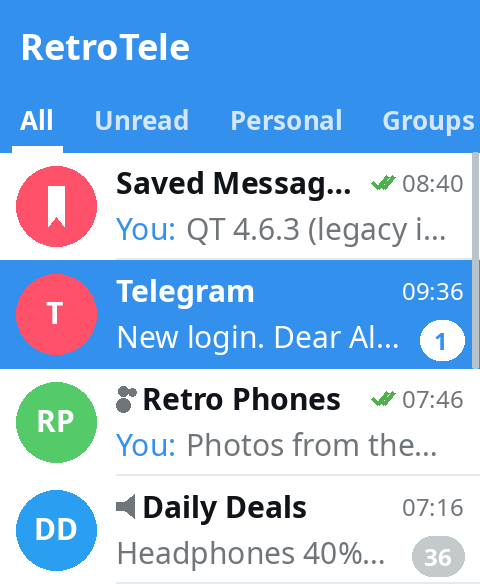
- Telegram-style look: blue header, round avatars, unread badges, online dots, chat bubbles and read ticks.
- Tabs for All, Unread, Personal, Groups, Channels, your own Telegram folders, Archived and Contacts.
- Log in with your phone number and the code Telegram sends you, including the two-step verification password.
- Read chats and load older messages by scrolling up. Replies, forwards and media show as labels.
- Write messages, reply to a message, edit, delete (for you or for everyone) and forward.
- Pictures show a preview in the chat, and can be viewed full screen.
- Music and audio files (MP3, M4A, AAC, AMR, WAV) can be played with a play/pause button and a position bar.
- Emoji are drawn as pictures, because the phone's fonts have none.
- Live incoming messages with a pop-up banner, read receipts and online status.
- Search chats and contacts, or open any @username.
- Call a contact's phone number as a normal phone call.
- Telegram voice and video calls with the official apps (call library 2.7.7): speaker or earpiece (key 2), mic boost, mute, send and receive video, front/rear camera switch.
- One file install: RetroTele.sis bundles Python for S60 and Nokia VoIP Audio Services.
- The chat list is cached, so it appears at once when the app starts.
- Profile of any chat, with the photo, status, username, bio and members.
- Fast mode (on by default) skips the SHA-256 integrity check on received data, which makes loading 2 to 3 times faster. Turn it off in Settings for the full check.
Python for S60 is bundled in the package. Its source is on GitHub.
The screenshots are PC renderings of the real UI with sample data, not phone captures.
Emoji images are from Twemoji by Twitter, Inc and contributors, under CC-BY 4.0.
Reusable parts of this app (all on the Open source page): the call engine, the MTProto stack, Opus for Symbian, the N79 media notes and the PyS60 toolbox, built with the toolchain.
Compatibility
| Device | Firmware | Status | Notes |
|---|---|---|---|
| Nokia N79 | works | Tested on a real Nokia N79 with Open4All: chats, files, Telegram voice calls with the official apps (speaker and earpiece), phone microphone, and video calls in both directions. |
Install notes
- Needs a hacked phone. Install the Easy Hack Kit (EasyHackKit 2.0, which installs RomPatcher+) first (see the unlock guide), then open RomPatcher+, tick Open4All rp+ and apply it. Without it the install fails with "Update error" or "requested application access not granted".
- Install RetroTele.sis (a single file that installs everything, including Python for S60 and Nokia VoIP Audio Services) and choose phone memory or the memory card. On a hacked phone either works wherever Python is installed. See memory card installs.
- On a computer, open my.telegram.org, go to API development tools, and create an app. Note your own api_id and api_hash (RetroTele ships none).
- Open RetroTele, enter the api_id and api_hash once, choose an access point (Wi-Fi or packet data), then log in.
- The first connection creates a secure key with Telegram. This takes a few seconds of 2048-bit maths on the phone.
- Two-step verification takes roughly an hour in pure Python on the N79. Either keep RetroTele open on the charger, or use the PC helper
tools/tg2fa.pyfrom the repository. - Data is kept in
E:\RetroTele\. The log isE:\retrotele_log.txt.
Known issues
- Headsets (Bluetooth or wired) are not supported in calls: the phone's own microphone and speaker or earpiece are always used.
- Video is small and can be choppy.
- The other person's video above 240x480 waits until their app steps down.
- Video needs call library 2.7.7 (Settings > Call version).
- If call audio ever stays silent, restart the phone (the Nokia VoIP audio service can get stuck).
- No secret chats, and no file or video download.
- No playback of GIFs or animated stickers. Stickers show as their emoji.
- Voice messages use Opus/OGG, which the N79 cannot decode yet.
- Needs a hacked phone: the call helpers use MultimediaDD, ReadDeviceData and WriteDeviceData, which a self-signed package cannot get on a stock phone.
- Two-step verification takes about an hour on the phone unless the PC helper is used.
Changelog
v0.16.224 Nov 2026
RetroTele 0.16.2 adds Telegram voice and video calls that work with the official Telegram apps, plus a single-file install.
What is new since 0.13.2
Voice calls
- Call and answer Telegram voice calls with the official apps (call library 2.7.7), in both directions.
- Sound through the phone speaker or the earpiece; key 2 switches between them.
- Uses the phone's own microphone, with a mic boost setting and a mute button.
Video calls
- Send your camera video and see the other person's video (software H.264 decoding), in either order.
- Switch between the front and rear camera, and show or hide your own picture.
Chats
- Image thumbnails, multi-select and caption-free sending when attaching files, plus the file manager and attach-any-file support from the 0.13 releases.
Install
- One file, RetroTele.sis, installs everything: the app, Python for S60 and Nokia's VoIP Audio Services.
Requirements
- A hacked Nokia N79 with RomPatcher+ and Open4All (Easy Hack Kit). The call helpers need capabilities a stock phone refuses, so the install fails otherwise.
- Your own Telegram api_id and api_hash.
Known limits
- Headsets (Bluetooth or wired) are not supported in calls; the phone's own microphone and speaker or earpiece are always used.
- Video is small and can be choppy.
- The other person's video above 240x480 waits until their app steps down.
- Video needs call library 2.7.7 (Settings > Call version).
- If call audio ever stays silent, restart the phone (the Nokia VoIP audio service can get stuck).
v0.13.222 Nov 2026
- Attach file: image thumbnails in the file manager, select several files at once (centre = mark, key 0 = send), and sending without a caption works (a Send / Add caption and send menu replaces the caption box).
- Single RetroTele.sis installs everything. Remove the old RetroTele in App. manager first, then install.
v0.13.122 Nov 2026
- Attach file now opens a proper file manager: drive list (Phone memory C:, Memory card E: with free space), folders with icons, file type icons, size and date, sorting and shortcuts to Images, Videos and Music.
- Single RetroTele.sis installs everything. Remove the old RetroTele in App. manager first, then install.
v0.13.022 Nov 2026
New: attach files. In a chat, Options > Attach file lets you browse the phone and memory card and send any file: pictures (sent as photos), music, video and every other file type, with an optional caption, a progress line and a Cancel option.
RetroTele.sis is one file that installs everything (app, native crypto, call audio, Nokia's VoIP Audio Services). If an older RetroTele is installed, remove it in App. manager first, then install.
v0.12.222 Nov 2026
One file installs everything. RetroTele.sis now also contains Nokia's VoIP Audio Services (needed for two-way call audio), so there is nothing else to install.
- Telegram chats, folders, pictures, music, voice-free messaging, edit/delete/forward
- Telegram voice calls with official Telegram apps (call protocol 2.7.7), mute, speaker/earpiece/Bluetooth
- Native crypto, memory-card install, Telegram-style interface
Needs Python for S60 1.4.5 and your own api_id/api_hash from my.telegram.org. If an older RetroTele, 'RetroTele call audio' or 'VoIP Audio Services' is installed, remove it in App. manager first.
v0.12.122 Nov 2026
- One package: RetroTele.sis now includes the call audio helper. Remove the old 'RetroTele call audio' / 'RetroTele audio test' apps in App. manager before installing, then install RetroTele.sis. (Nokia's VoIPAudioSrvc component is still needed once; you already have it.)
- Settings no longer shows the test items; calls always use version 2.7.7 so they work with official Telegram apps.
v0.12.022 Nov 2026
Settings > Call version: 2.7.7 (official apps). Install RetroTele.sis and RetroTele-callaudio.sis, then call a Play Store phone (or have it call you). First build with the full 2.7.7 call stack: ICE through Telegram's relay, encrypted transport, Opus audio. Untested on a real call; the log (retrotele_callaudio.txt) shows how far it gets.
v0.11.422 Nov 2026
2.7.7 announcement now sets udp_p2p like official apps. Probe calls log the data needed to decode the peer's setup messages.
v0.11.322 Nov 2026
Settings > Call version now cycles 2.4.4 / 2.7.7 / mimic. Experiment build for finding what Telegram's servers accept from the N79.
v0.11.222 Nov 2026
Logs the call protocol announced by official apps when they call you, and the full discard details.
Source & credits
- Author
- Manoj Anasuri
- Repository
- github.com/manojanasuri16/RetroTele
- Release
- github.com/manojanasuri16/RetroTele/releases/tag/v0.16.2
- Capabilities
- NetworkServices, LocalServices, ReadUserData, WriteUserData, UserEnvironment
- Added
- 22 Nov 2026
Something wrong or want it removed? Tell us.